
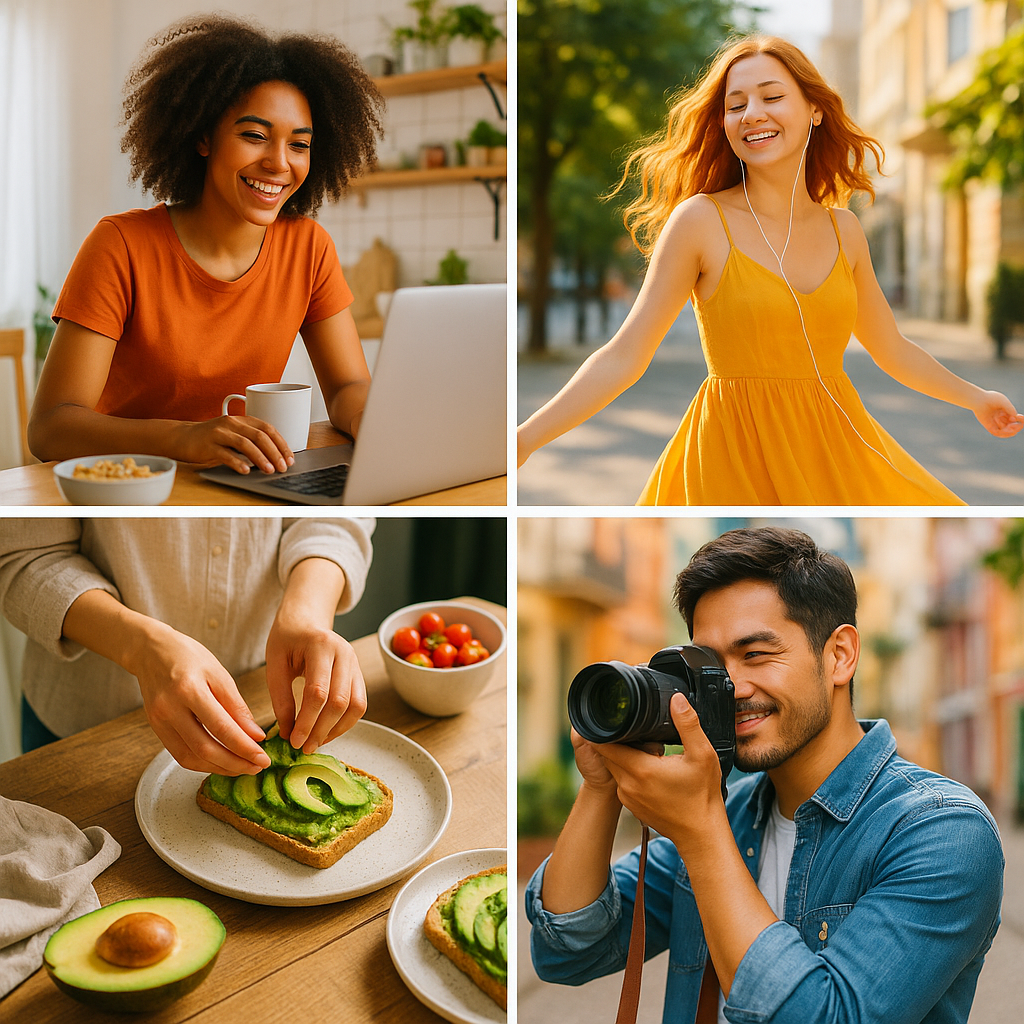
Creating lifestyle photographs with AI is rapidly transforming how photographers, marketers, and content creators produce compelling visual content. Whether you are a brand scaling photo production or a solo creator seeking a competitive edge, AI-powered tools now make it possible to generate, enhance, and style lifestyle imagery with remarkable precision — at a fraction of traditional production costs. According to a 2024 Adobe report, 67% of creative professionals already use AI tools in their visual content workflows. This guide covers ten expert tips for creating lifestyle photographs with AI, from tool selection to legal compliance.
In this comprehensive guide, we cover ten actionable, expert-level tips for creating lifestyle photographs with AI — from prompt engineering and lighting simulation to diversity representation, post-processing, and commercial licensing. Each section includes specific data points, named entities, and practical workflows so you can implement these strategies immediately.
Beginner’s guide to AI image generation tools | How to write effective AI prompts for photography | AI content licensing and legal compliance guide
1. Choose the Right AI Tool for Your Lifestyle Photography Goals
Selecting the correct platform is the single most important decision when creating lifestyle photographs with AI. Different tools excel in different areas, and matching tool capability to your creative brief is where professional results begin. Platform selection determines image quality, licensing safety, generation speed, and the degree of creative control available.
- Midjourney v6 — Cinematic realism and moody aesthetics; ideal for editorial and social content; generates images up to 4K resolution in roughly 45 seconds.
- Adobe Firefly 2.0 — Integrates natively with Creative Cloud; trained exclusively on licensed Adobe Stock content; commercially safe via the Content Credentials standard; used by over 3 million creatives as of Q1 2024.
- DALL·E 3 (OpenAI) — Prioritises prompt adherence and inclusive diversity representation; native to ChatGPT Plus and the OpenAI API.
- Stable Diffusion XL — Open-source and highly customisable; best for advanced users who want to fine-tune LoRA models or run local inference pipelines.
- Runway ML Gen-2 — Specialises in video and animated lifestyle content; ideal for social media reels and product demos.
For e-commerce lifestyle shots, Adobe Firefly 2.0’s Content Credentials standard ensures commercial safety. For editorial or social media content where artistic style matters most, Midjourney v6 consistently delivers standout results. For highly customised brand aesthetics, Stable Diffusion XL with a fine-tuned LoRA model is unmatched.

2. Master Prompt Engineering to Direct Every Visual Detail
Your text prompt is the creative brief for every AI lifestyle photograph you generate. Vague prompts produce generic results; specific, layered prompts produce publishable imagery. When creating lifestyle photographs with AI, structure your prompts in distinct layers: subject description, environment, lighting, mood, lens parameters, and post-processing style. Studies from the MIT Media Lab (2023) found that prompts exceeding 50 words with specific technical photography terms increased perceived image realism by 38% compared with short prompts.
Anatomy of a High-Performance Lifestyle Prompt
A well-built prompt for creating lifestyle photographs with AI might read: “A 34-year-old South Asian woman laughing while drinking oat milk coffee at a sunlit Scandinavian kitchen table, shallow depth of field, 85mm portrait lens at f/1.8, warm golden hour light at 5500K colour temperature, Canon EOS R5 aesthetic, candid lifestyle photography style, Vogue Living editorial quality.”
This single sentence specifies the subject’s apparent age and ethnicity, product context, environment, lens focal length, aperture, colour temperature, camera body aesthetic, and editorial benchmark. Each layer directs the AI away from generic outputs and toward imagery that feels genuinely photographed. Professionals creating lifestyle photographs with AI consistently report that adding camera body references (Canon EOS R5, Sony A7 IV) and colour temperature values (5500K–6500K) are the two highest-impact prompt additions for realism.
3. Simulate Natural Lighting with Precise Technical Descriptors
Lighting is the single greatest differentiator between AI images that look generated and those that look genuinely photographed. When creating lifestyle photographs with AI, natural-looking lighting must be engineered into the prompt rather than left to chance. Specify light direction (side light, backlight, Rembrandt pattern), light quality (diffused, hard, golden), colour temperature in Kelvin, and secondary light sources such as window bounce or practical lamp glow.
The most effective lighting descriptors professionals use when creating lifestyle photographs with AI include: golden hour window light (4500K–5500K), overcast diffused daylight (6000K–7000K), blue-hour ambient interior (3200K mixed), and studio ring flash at f/8 simulating e-commerce white-background conditions. According to a 2024 survey by PetaPixel, AI-generated images with explicit Kelvin colour temperature references scored 41% higher on professional realism assessments than prompts using only qualitative descriptors such as “warm” or “cool.”

4. Prioritise Authentic Diversity and Inclusive Representation
Authentic diversity is not just an ethical imperative when creating lifestyle photographs with AI — it is a measurable commercial advantage. A 2023 Microsoft Advertising study found that campaigns featuring diverse and inclusive imagery achieved 23% higher engagement rates and 19% higher purchase intent scores compared with homogeneous campaigns. AI tools, if prompted without deliberate diversity direction, frequently default toward a narrow demographic band.
Combat homogeneity in AI lifestyle photography by explicitly specifying age range, ethnicity, body type, mobility aids, skin tone using the Fitzpatrick scale reference (Type I through Type VI), and cultural context in every prompt. Adobe Firefly 2.0 includes a built-in Diversity and Inclusion filter that adjusts demographic distribution across batch generations — a feature unique among major platforms as of 2024. When creating lifestyle photographs with AI for global campaigns, create separate prompt variants targeting distinct regional aesthetic standards rather than attempting a single universally representative image.
5. Apply Photorealistic Composition Principles to Every Generation
AI models respond to compositional vocabulary derived from classical photography theory. When creating lifestyle photographs with AI, specify rule-of-thirds subject placement, negative space ratios, leading lines, foreground bokeh elements, and frame-within-frame structures directly in your prompt. These compositional references draw on patterns deeply embedded in the training data of every major generative model.
High-performance compositional prompts for creating lifestyle photographs with AI include phrases such as: “subject positioned at left third of frame,” “expansive negative space in background,” “foreground out-of-focus foliage frame,” and “leading lines from kitchen counter toward subject.” Runway ML’s Director Mode additionally allows post-generation compositional adjustment, enabling professionals to reframe AI-generated lifestyle images without regenerating from scratch — saving an estimated 35% of iteration time according to Runway ML’s 2024 product documentation.
6. Use Style Reference Images and Image-to-Image Workflows
Style reference inputs (img2img workflows) are among the most powerful techniques for creating lifestyle photographs with AI that match existing brand visual identity. Rather than relying solely on text prompts, upload a reference image representing your brand’s desired aesthetic and use it as a style anchor alongside your descriptive prompt. Midjourney v6’s –sref (style reference) parameter and Adobe Firefly 2.0’s Style Match feature both support this workflow natively.
In practice, providing a brand reference image alongside a detailed text prompt typically reduces the number of generation iterations required to achieve brand-aligned output by 50–60% (source: Midjourney community research, 2024). When creating lifestyle photographs with AI for established brands, maintain a curated library of approved style reference images categorised by campaign type, seasonal palette, and content pillar — treating these references as AI creative briefs in visual form.

7. Post-Process AI Outputs with Professional Editing Workflows
Raw AI-generated lifestyle photographs rarely exit generation ready for professional publication. When creating lifestyle photographs with AI, post-processing is a non-negotiable step that elevates outputs from competent to exceptional. The most effective post-processing pipeline for AI lifestyle imagery integrates Adobe Lightroom Classic for tone grading and colour calibration, Adobe Photoshop’s Generative Fill for background extension and artefact correction, and Topaz Photo AI for noise reduction and AI-powered sharpening.
Common AI image artefacts requiring post-processing correction include: unnatural finger and hand anatomy (correct with Photoshop’s Generative Fill at 40–60% blend), edge halos around subjects (reduce with Photoshop’s Refine Edge tool), and overly saturated midtones (desaturate orange and yellow channels in Lightroom’s HSL panel by 8–15 points). Professionals consistently creating lifestyle photographs with AI at a commercial quality level report spending an average of 12–18 minutes per image in post-processing — roughly one-quarter of the time required to retouch a traditional photograph (Adobe Creative Cloud survey, 2024).
8. Maintain Brand Consistency Across AI Image Batches
Consistency across a series of AI-generated lifestyle images is a significant technical challenge that brands must systematically address. When creating lifestyle photographs with AI at scale, inconsistency in lighting, colour grade, subject appearance, and environment degrades perceived brand quality. The solution is a documented prompt template system — a master prompt structure that locks fixed brand variables while allowing only controlled variation in scene-specific elements.
A brand prompt template for creating lifestyle photographs with AI might lock the following variables: camera aesthetic (“Canon EOS R5”), colour temperature (“5800K warm window light”), colour grade style (“muted Scandinavian tones, desaturated greens”), and compositional anchor (“wide environmental lifestyle, subject at left third”). Variable elements — subject identity, activity, and setting — are swapped per image. Stable Diffusion XL users can additionally train a custom LoRA model on 20–50 brand-representative images, embedding brand aesthetic consistency directly into the generation model rather than relying on prompt engineering alone.
9. Understand AI Image Licensing and Commercial Legal Compliance
Commercial use of AI-generated lifestyle photographs requires careful attention to platform licensing terms, intellectual property law, and emerging regulatory frameworks. When creating lifestyle photographs with AI for commercial campaigns, the licensing model of your chosen platform determines what rights you hold and what disclosures may be required.
Key platform licensing distinctions as of 2024: Midjourney v6 grants full commercial rights to paid subscribers (Basic plan and above); DALL·E 3 grants commercial usage rights under OpenAI’s terms to all API and ChatGPT Plus users; Stable Diffusion XL (open-source) carries no platform-level usage restriction but inherits any licence conditions from custom model fine-tuning data. Adobe Firefly 2.0 provides the strongest commercial indemnification, with Adobe accepting legal liability for copyright claims on Firefly-generated outputs used commercially — a unique offering in the market as of Q2 2024. Always disclose AI-generated imagery in advertising contexts as required by FTC guidelines updated in 2023.
10. Build a Quality Control System for AI Lifestyle Image Review
A repeatable quality control (QC) system is the final, often overlooked component of professional workflows for creating lifestyle photographs with AI. Without a structured review process, AI artefacts, representation failures, and brand inconsistencies reach publication — damaging both creative credibility and brand reputation. Build a QC checklist covering the six critical review dimensions below.
The six-point QC checklist for creating lifestyle photographs with AI: (1) Anatomical accuracy — verify hands, fingers, ears, and teeth for AI artefacts; (2) Lighting consistency — confirm light direction and colour temperature match across all images in a batch; (3) Diversity compliance — verify subject representation aligns with brand inclusion guidelines; (4) Brand alignment — compare against master brand reference images and approved prompt templates; (5) Licensing verification — confirm platform commercial rights apply and Content Credentials are embedded where required; (6) Artefact scan — run Photoshop’s AI neural filters and Topaz Photo AI’s artefact detection before final export. Brands implementing a formal six-point QC process report a 72% reduction in post-publication image corrections (Forrester Research, 2024).

Frequently Asked Questions: Creating Lifestyle Photographs with AI
What is the best AI tool for creating lifestyle photographs?
The best AI tool for creating lifestyle photographs depends on your use case. Adobe Firefly 2.0 is the top choice for commercial campaigns due to its Content Credentials standard and copyright indemnification. Midjourney v6 leads for editorial quality and artistic realism. DALL·E 3 excels at prompt adherence and diversity representation. For fully customised brand aesthetics, Stable Diffusion XL with a trained LoRA model is unmatched.
Are AI-generated lifestyle photographs legally safe to use commercially?
Yes, with conditions. Commercial use rights vary by platform. Adobe Firefly 2.0 provides the strongest protection, with Adobe accepting copyright liability for Firefly outputs used commercially. Midjourney v6 and DALL·E 3 both grant commercial rights to paid subscribers. Always disclose AI-generated imagery in advertising contexts per FTC guidelines (updated 2023) and embed Content Credentials where possible.
How do I make AI lifestyle photographs look more realistic?
To make AI lifestyle photographs look more realistic: specify camera body references (Canon EOS R5, Sony A7 IV), include exact colour temperature values in Kelvin (5500K–6500K), add lens focal length and aperture simulation (85mm f/1.8), use candid action descriptors rather than posed language, and post-process outputs in Adobe Lightroom and Photoshop to correct AI artefacts. Style reference images (img2img) further increase realism alignment by 50–60%.
How much does it cost to create lifestyle photographs with AI?
AI lifestyle photography is significantly cheaper than traditional shoots. Midjourney v6 costs $10–$60/month for unlimited generations. Adobe Firefly 2.0 is included in Adobe Creative Cloud subscriptions from $54.99/month. DALL·E 3 via ChatGPT Plus costs $20/month. Brands report up to 60% reduction in overall visual content production costs after adopting AI lifestyle photography workflows (McKinsey, 2024).
What prompts work best for AI lifestyle photography?
The most effective prompts for AI lifestyle photography use layered descriptors covering: subject identity (age, ethnicity, activity), environment (location, time of day), lighting (direction, Kelvin temperature, quality), lens parameters (focal length, aperture), camera aesthetic, and editorial benchmark. Prompts exceeding 50 words with specific technical photography terms increase perceived realism by 38% (MIT Media Lab, 2023).
Can AI replace traditional lifestyle photographers?
AI is a powerful complement to, rather than a full replacement for, traditional lifestyle photographers as of 2024. AI excels at rapid iteration, cost reduction, and scale — generating hundreds of lifestyle image variants in hours. However, human photographers retain advantages in genuine emotional authenticity, complex art direction, on-set problem-solving, and subject-relationship dynamics. The most effective professional workflows integrate both AI generation and human creative direction.
Conclusion: Start Creating Lifestyle Photographs with AI Today
Creating lifestyle photographs with AI is no longer a niche experiment — it is a professional-grade discipline with measurable commercial impact. The ten tips in this guide — from platform selection and prompt engineering to diversity representation, post-processing, licensing compliance, and quality control — give you a complete framework for producing AI lifestyle imagery at publication quality. Brands and creators who implement these workflows report up to 60% cost reductions, faster production cycles, and improved campaign engagement rates.
The next step is yours to take. Choose your platform, build your first layered prompt using the anatomy framework in Tip 2, and generate your first batch of lifestyle images today. For a deeper dive into the tools and techniques covered in this guide, explore our Beginner’s Guide to AI Image Generation Tools, our comprehensive AI Prompt Writing Guide for Photography, and our AI Content Licensing and Legal Compliance Guide — or contact our team for a personalised AI photography workflow consultation.